Hello friends, are you looking to Driving Licence Download? If so, you’ve come to the right website. Through online platforms launched by the Government of India, such as DigiLocker, the mParivahan app, and the Sarathi parivahan, you can not only easily download your driving license but also check your DL status online.
Driving License Related Services
Driver’s license services (new, renewal, duplicate), and learner license: appointment test book, duplicate license, application status check, and more.
Appointment Booking
You can easily schedule an appointment online at the RTO.
Duplicate Driving Licence
If your DL is lost or damaged, you can apply for a duplicate license.
Application Status
You can track the status of your license/learner’s license application.
Learner’s Licence Test
You can take an online test for your learner’s license and check your result online.
Download Driving Licence: Requirements & Rules
Before downloading an official Driving Licence, it’s important to know the following important points:
Requirements:
- You must have a registered mobile number linked to your DL.
- You must have a DL number or Learner’s Licence number.
- Valid identity proof (Aadhaar card, PAN, or other government ID) is required.
Rules:
- A digital driving license is legally valid.
- Download it only from verified platforms such as DigiLocker, mParivahan, or Sarathi.
- Using someone else’s DL is a criminal offense.
How to Download a driving license?
To download a driving license online, you can follow the three methods below:
- Parivahan Sewa & Sarathi Parivahan Portal
- DigiLocker
- mParivahan App
Method 1: Parivahan Sewa & Sarathi Parivahan Portal
Step 1: Visit the official Parivahan Sewa website:
- Visit the official website of Parivahan Sewa (https://parivahan.gov.in/)
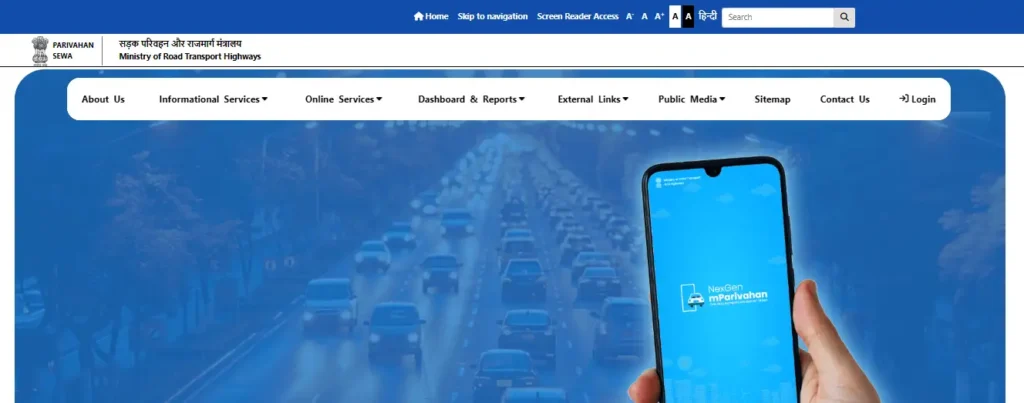
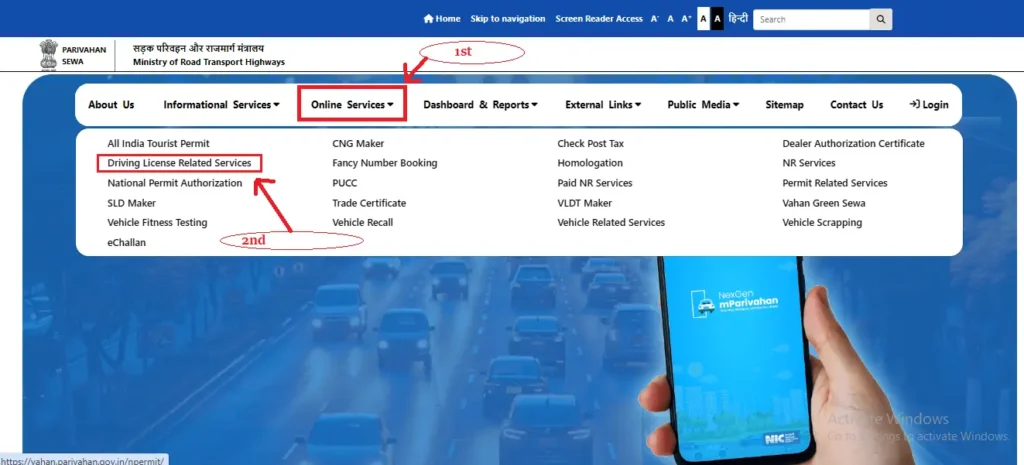
Step 2: Click on Online Services menu:
- Click on “Online Services” and select “Driving License Related Services.”
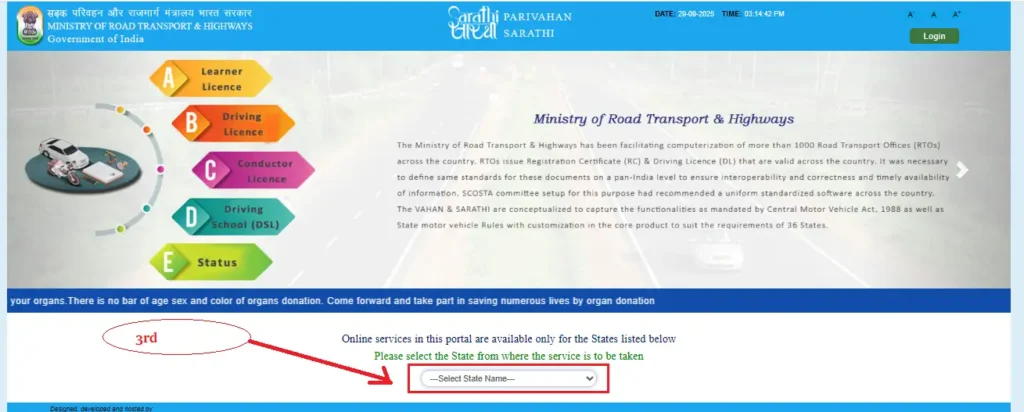
Step 3: Select Your State:
- Please select the state from where the service is to be taken.
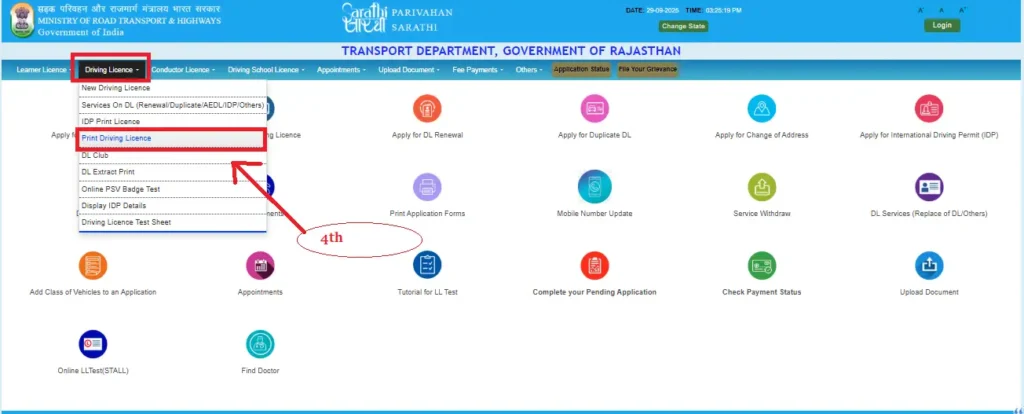
Step 4: Next, select the Driving Licence option:
- Choose “Driving Licence” and click on the “Print Driving Licence”.
Step 5: Enter your details to print your Driving Licence:
- Application Number
- Date of Birth
Step 6: Click the “Submit” button:
- If you’ve entered the correct information for your Driving Licence Print, click the “Submit” button below.
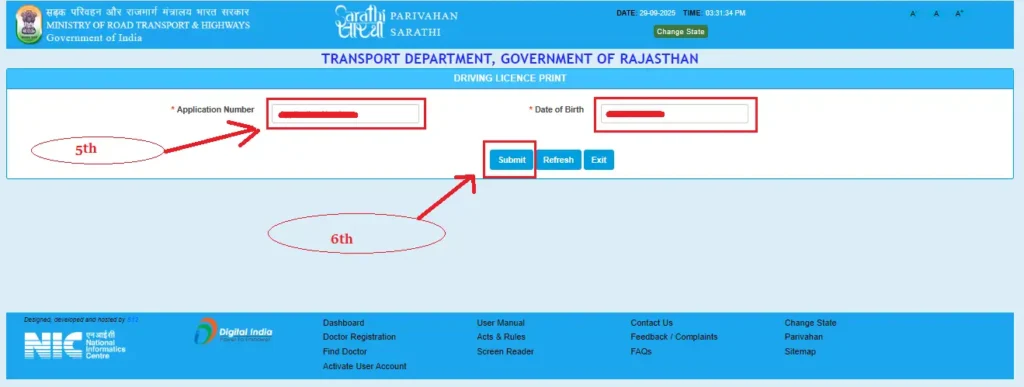
You can download and print your Driving Licence through the Parivahan Sewa & Sarathi Parivahan Portal. Now, let’s learn how to download your Driving Licence from DigiLocker. The step-by-step process is given below.
Method 2: How to Download a Driving License from DigiLocker?
If you want to download a Driving License through DigiLocker, follow the steps below:
Step 1: Go to the DigiLocker App or Website:
- First, go to the DigiLocker App or DigiLocker’s website, click here: https://www.digilocker.gov.in/
Step 2: Sign Up/sign in:
- If you already have an account, log in, otherwise register.
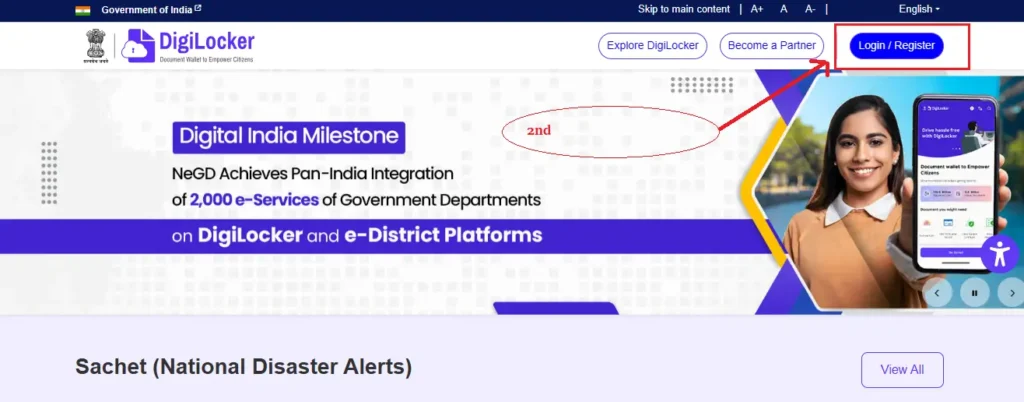
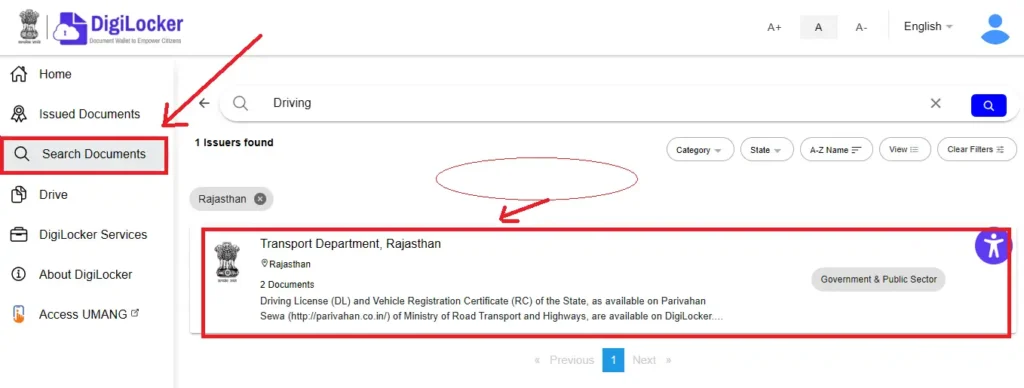
Step 3: Search for a Driving License:
- After logging in, go to the DigiLocker homepage. You will see the “Search Document” box, where you type in your Driving License.
- Then select the “Driving License – Ministry of Road Transport and Highways” option.
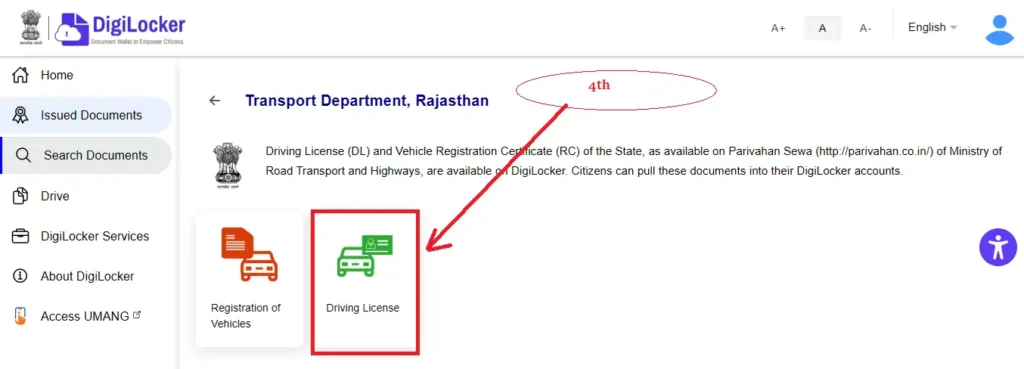
Step 4: Now click on the Driving License option.
- Next, click on the “Driving License” option and enter your Driving License number.
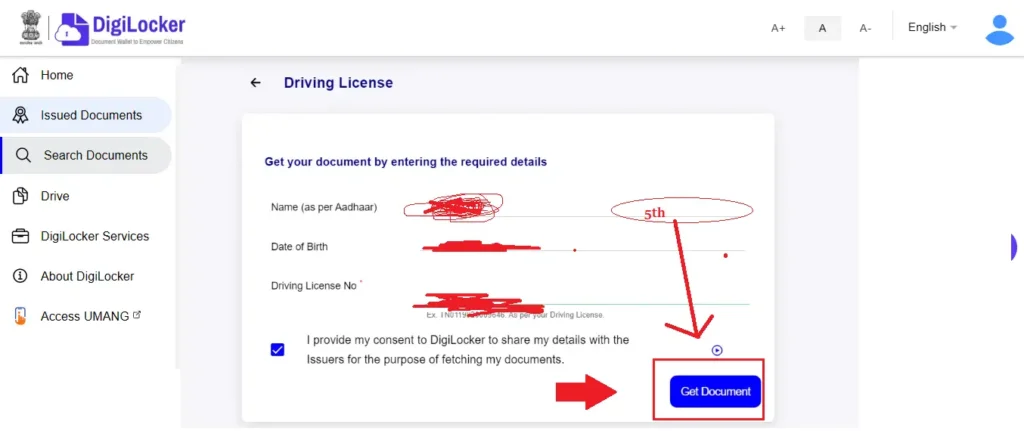
Step 5: Click “Get Document.”
- Enter your name, date of birth, and Driving License number, then click “Get Document”. Your Driving License will appear on the screen. Click the Download button to save your Driving License to your laptop.
Method 3: How to download a driving license using the mParivahan app?
The mParivahan app is a mobile application launched by the Government of India. You can access services related to your driving license and vehicle. Through this app, you can download your DL, check your DL status, and use your digital license. Below are the steps to download your license using the mParivahan mobile application:
Step 1: Download the mParivahan app:
First, go to the Google Play Store or Apple App Store on your smartphone. and search for the “mParivahan” app.
Step 2: Click on the mParivahan App:
Now download the app by clicking the Install button.
Step 3: Register or Login:
If you’re installing the app for the first time, register by entering your mobile number.
If your account is already registered, enter your details and login.
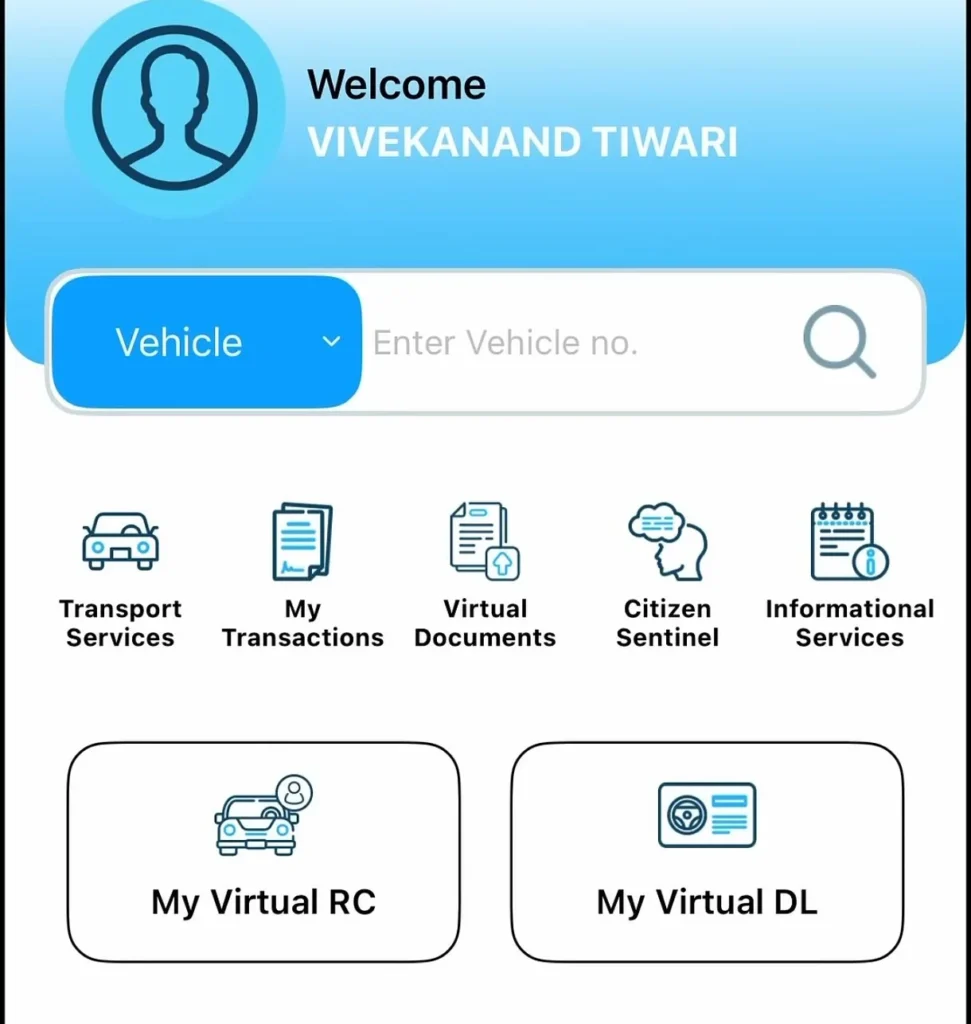
Step 4: select the “Driving License (DL)”
You’ll be taken to the app’s dashboard and select the “Driving License (DL)” option.
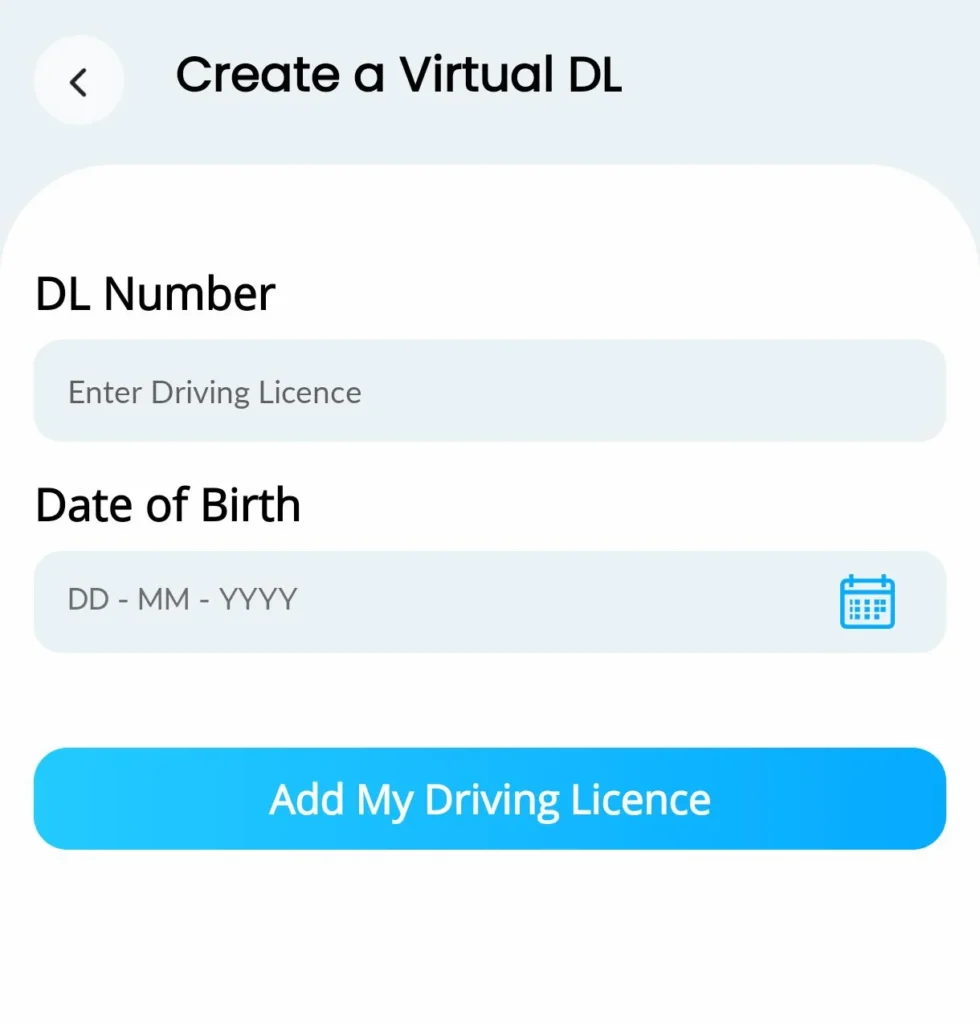
Step 5: Enter your details.
Enter your driving license number and date of birth (DOB).
Step 6: Click on Add My Driving Licence.
Click on the “Add My Driving Licence” button.
Step 7: Click on the Download button.
You can now download your virtual driving license. You can use it offline. You can also save it as a PDF for further reference.
How to Check Your DL Status Online?
If you want to check your Driving License (DL) Status online, you need to follow the steps below:
- First, visit the website https://parivahan.gov.in/rcdlstatus/
- Enter your Driving License Number, Date of Birth, and Verification Code.
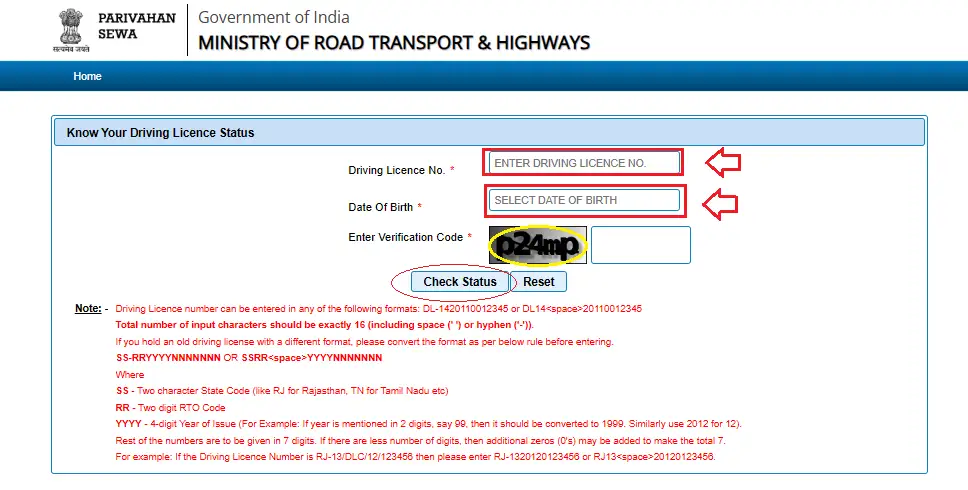
- Click the “Check Status” button.
- You will now see your Driving License Status on your screen.
Learning License Download & Print
If you want to download your Learning License, please follow the steps below:
- First, go to the Sarathi Parivahan official website https://sarathi.parivahan.gov.in/.
- select your state.
- You will be taken to the website’s home page. Click on the “Learner License” option in the menu.
- Select the “Print Learner’s License (Form-3)” option.
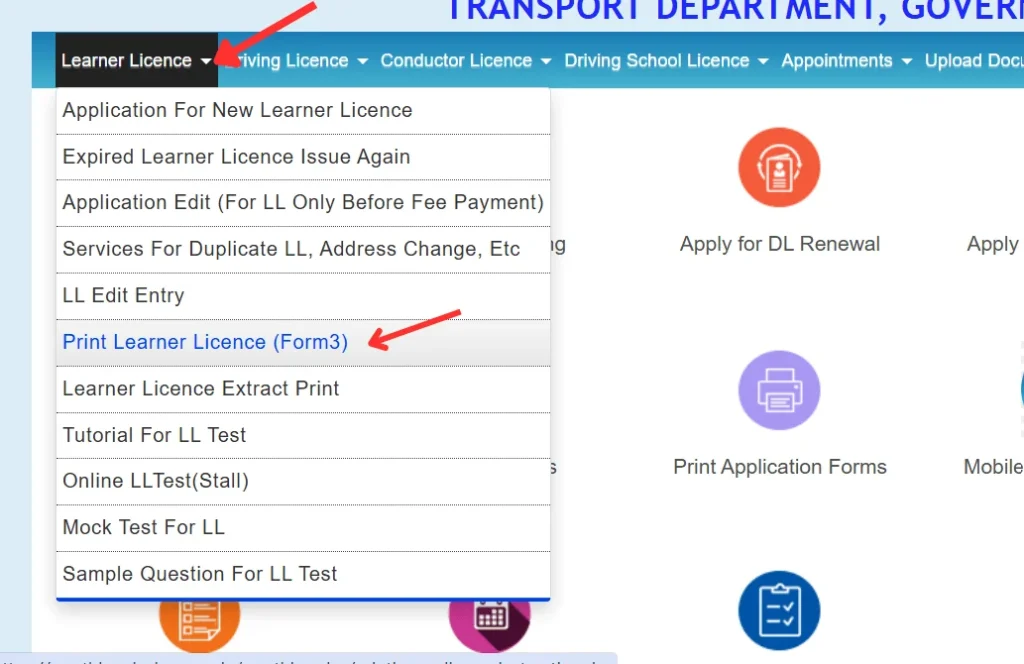
- Then click on “Proceed.”
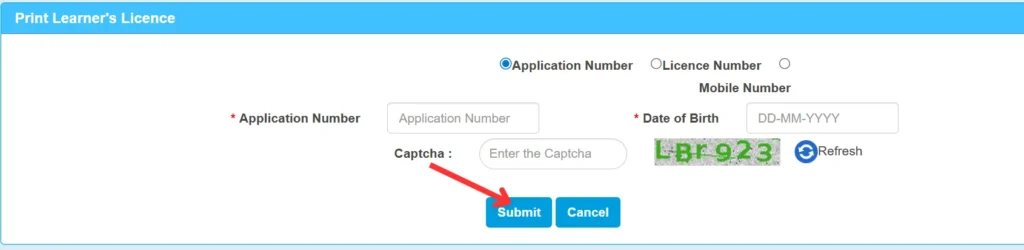
- A new page will open where you can download your Learner’s License using the following methods:
- Application Number
- License Number
- Mobile Number
- Enter your Date of Birth and Captcha.
- Click on the “Submit” button and you can now download your Learning License.
Driving License realted Helpline
| Phone Number | Hours | |
| helpdesk-sarathi@gov.in | +91-120-4925505 | 06:00 AM – 12:00 AM |
FAQ’s : DL Download Realted
1. How to download a driving license?
2. How to download a soft copy of your driving license?
3. How many ways are there to download a driving license?
1. via the Parivahan Portal
2. via the DigiLocker App
3. via the mParivahan App
Conclusion
Today you learned that you can download your driving license (DL) online and check its status. If you encounter any problems, please email us.
Thank you for visiting our website and don’t forget to save or bookmark drivinglicensedownload.com.